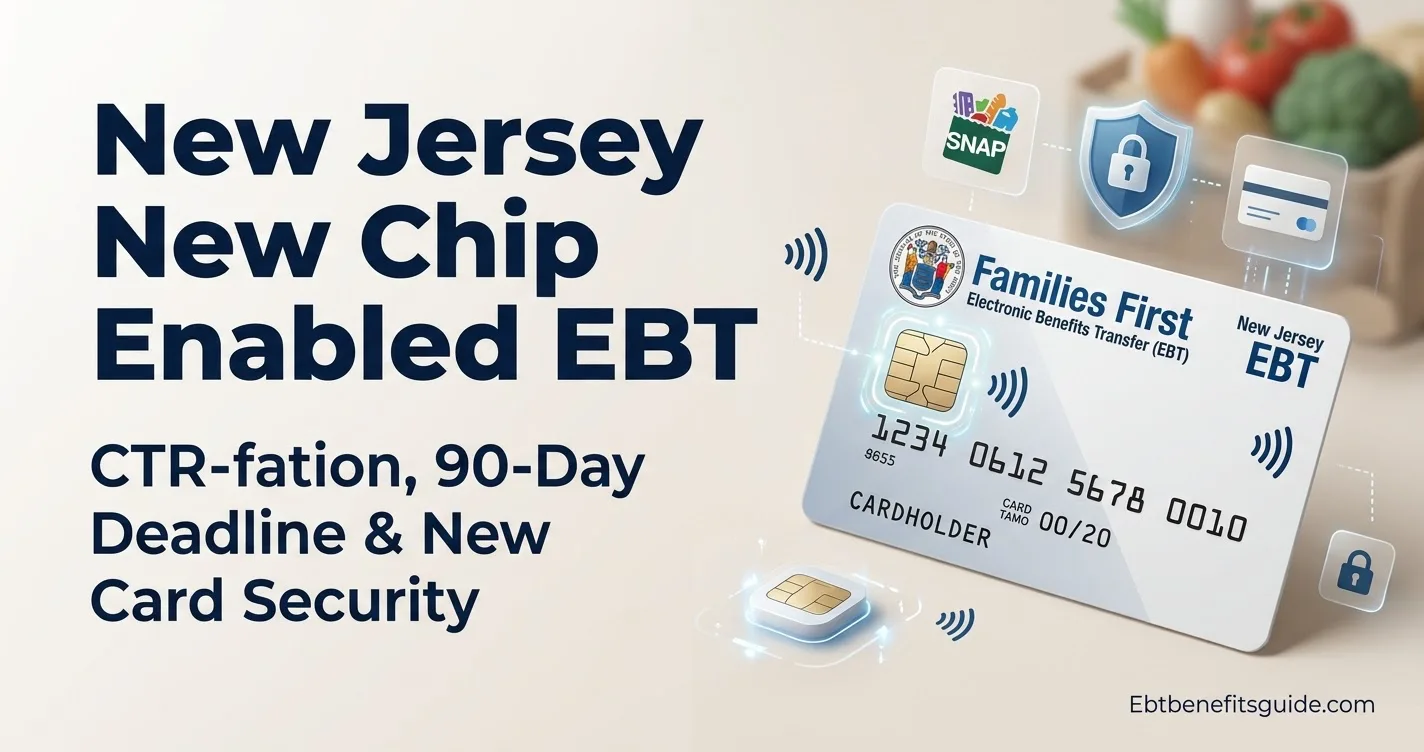
New Jersey has rolled out its new chip-enabled Families First EBT card statewide for SNAP and Work First New Jersey (WFNJ) recipients. The card gets a serious upgrade — an encrypted chip, tap-to-pay technology, a 3-digit security code, and a card lock/unlock feature built specifically to fight electronic benefit theft.
If you already get one, the action item is straightforward: activate it and renew your PIN. Your existing Food Stamps or WFNJ balance moves to the new card automatically, and you can start using it the moment activation is complete.
What Is the New Jersey Chip-Enabled EBT Card?
The new card is the updated version of the Families First EBT card — the same card used by NJ SNAP and WFNJ participants, but rebuilt from a security standpoint.
New Jersey Department of Human Services announced statewide availability on September 10, 2026, after running a pilot in Cumberland, Essex, and Mercer counties. That pilot wasn’t small — the state recorded more than 100,000 chip transactions and 41,000 tap-to-pay transactions before going statewide.
The new card includes:
- Encrypted chip
- Tap-to-pay technology
- 3-digit security code
- Card lock/unlock feature
- Updated card design
- Cardholder information moved to the back
The chip and tap features reduce risk from EBT skimming. That said, they don’t replace basic security habits — more on that below.
Why Is New Jersey Replacing EBT Cards?
Skimming. Criminals place illegal devices on payment terminals to steal card details and PIN codes, then use that data to drain accounts or create cloned cards. It’s more common than most people realize, and old magnetic stripe cards offered almost no protection against it.
The chip-enabled design makes that kind of theft significantly harder. New Jersey also recommends locking your card between uses, checking transactions regularly, and keeping your PIN private — the card upgrade doesn’t replace those habits, it works alongside them.
Who Gets the New NJ EBT Card?
The new Families First chip/tap card goes to every New Jersey resident receiving benefits through:
- NJ SNAP
- Work First New Jersey (WFNJ)
The rollout is statewide. Cumberland, Essex, and Mercer were pilot counties — everyone else is now included.
How to Activate Your New NJ EBT Card
Activate the card as soon as it arrives. Don’t let it sit. You have three options:
- NJFamiliesFirst.gov
- ConnectEBT mobile app
- EBT Customer Service — 1-800-997-3333
ConnectEBT is the official app for Families First EBT users. Beyond activation, it handles balance checks, transaction history, PIN changes, and the card lock feature.
Depending on your activation method, have the following ready:
- 16-digit card number
- Card expiration date
- 3-digit security code
- Last four digits of your Social Security number
- Date of birth
- A new 4-digit PIN
Pick a PIN code that would be genuinely hard for someone else to guess. Never share it, not even with someone claiming to help you.
What Happens to Your Old NJ EBT Card?
You can keep using the old card right up until the new one is activated. You just can’t use both at the same time — the system doesn’t allow it.
The moment you activate the new chip card, the old one goes dark. NJ recommends destroying it. Your benefit balance transfers to the new card; nothing is lost in the process.
Important: 60 Days vs. 90 Days
These two deadlines trip people up, so read this carefully.
| Deadline | What It Means |
|---|---|
| 60 days | Your old card expires 60 days after the new card is issued |
| 90 days | You have 90 days from receiving the new card to activate it |
| After activation | Your old card is immediately deactivated |
Miss the 90-day window and you’ll need to request another card before accessing your benefits — and fees may apply. Don’t wait.
Will Your SNAP Benefits Transfer to the New Card?
Yes. SNAP and WFNJ benefits transfer automatically to the new Families First EBT card. They’re available as soon as activation is complete.
One thing worth understanding: the expiration date on the physical card applies to the card itself, not your benefits. A replacement card doesn’t wipe your balance.
Curious how benefits are typically scheduled in your state? The EBT payment schedule by state covers deposit timing for NJ and every other state.
How to Use the New NJ EBT Chip Card
New Jersey recommends chip or tap over swiping whenever the retailer supports it. Swiping is less secure — plain and simple.
To use the chip: Insert the card into the payment terminal and follow the screen options.
To use tap-to-pay: Hold the card near the contactless payment area when prompted.
If the terminal doesn’t support chip or tap, swiping is still an option. But use chip or tap first whenever you can. For a full breakdown of how EBT cards work by state, including accepted payment methods and retailer participation, that guide covers it in detail.
How to Lock Your New Jersey EBT Card
The lock/unlock feature is one of the most practical additions on this card.
Manage it through NJFamiliesFirst.gov or the ConnectEBT app. The recommended routine is simple:
- Keep the card locked when you’re not shopping
- Unlock it before making a purchase
- Complete the transaction
- Lock it again immediately after
- Check your transaction history regularly
Honestly, this takes about five seconds and dramatically reduces the risk of unauthorized use. Make it a habit.
What If Your New NJ EBT Card Does Not Work?
Run through this before calling customer service:
- Is the card activated?
- Is it currently locked?
- Do you have available benefits?
- Try inserting the chip
- Try tap-to-pay if the terminal supports it
- If chip/tap isn’t available, follow the terminal prompts for swiping
Still not working? Call EBT Customer Service at 1-800-997-3333.
One firm warning: do not send your PIN or full card number to anyone who contacts you out of nowhere claiming to represent EBT or the state. That’s a scam.
What If You Did Not Receive Your New Card?
New Jersey mails the new cards in a plain white envelope from Kentucky — not from your local County Social Service Agency. If you weren’t expecting that, it’s easy to miss or discard.
If you haven’t received it:
- Verify your mailing address at NJFamiliesFirst.gov or through ConnectEBT
- If the address is wrong, update it through MyNJHelps.gov or your County Social Service Agency
- Contact EBT Customer Service if you need further help
This applies statewide — North Jersey, Central Jersey, South Jersey, all counties.
What If Your EBT Benefits Are Stolen?
Here’s the thing: the chip card makes theft harder, but it doesn’t make it impossible. Skimming, cloning, and phishing are still threats. If something looks off in your transaction history, act fast — change your PIN, lock the card, and report it.
There’s a critical rule to know right now: SNAP and WFNJ benefits stolen electronically on or after December 21, 2024, are not eligible for replacement under current federal funding rules. That makes prevention the only real protection you have.
If you want to understand what SNAP covers and what it doesn’t, the SNAP food restrictions by state guide lays out exactly what’s allowed in New Jersey and beyond.
New NJ EBT Card vs. Old Card
| Feature | Old EBT Card | New Chip/Tap Card |
|---|---|---|
| Encrypted chip | No | Yes |
| Tap-to-pay | No | Yes |
| 3-digit security code | No | Yes |
| Lock/unlock | Available | Available |
| SNAP benefits | Yes | Yes |
| WFNJ benefits | Yes | Yes |
| New PIN | — | Required at activation |
The everyday difference is simple: chip or tap instead of swipe. That’s the core change most users will feel at checkout.
Does the New Card Change Your SNAP Benefits?
No. The card is a security upgrade, not a change to your eligibility or benefit amount.
Your SNAP or WFNJ balance transfers intact. The card itself has an expiration date, but unused benefits follow separate program rules — New Jersey applies a federal nine-month timeframe for expunging unused SNAP benefits from inactive accounts.
If you’re unsure whether you qualify for SNAP or want to check updated income thresholds, the SNAP income limits by state page has current figures. And if you’re not already using your EBT card at stores that offer discounts, the EBT discounts by state guide is worth a look — a lot of people miss those savings entirely.
Quick Checklist When Your New Card Arrives
- Activate the new Families First EBT card
- Create your new PIN
- Confirm your SNAP or WFNJ balance
- Use chip or tap whenever available
- Lock the card when it’s not in use
- Destroy the old card after activation
- Never share your PIN
- Review transactions regularly
- Report a lost or stolen card immediately
FAQs About the New Jersey Chip EBT Card
1. What is the new NJ chip EBT card?
It’s the updated Families First EBT card being issued statewide to New Jersey SNAP and WFNJ participants — now with an encrypted chip, tap-to-pay, a 3-digit security code, and card lock/unlock functionality.
2. How do I activate my new New Jersey EBT card?
Activate through NJFamiliesFirst.gov, the ConnectEBT app, or by calling 1-800-997-3333. You’ll need to set a new PIN during the process.
3. How long do I have to activate the new NJ EBT card?
90 days from when you receive the card. After that, the card deactivates and you’ll need to request a replacement — fees may apply.
4. Can I still use my old NJ EBT card?
Yes, until the new card is activated. You can’t use both simultaneously. Once the new EBT card is active, the old one is deactivated immediately.
5. Will my SNAP balance transfer to the new card?
Yes. SNAP and WFNJ benefits transfer automatically. Nothing is lost during the card swap.
6. Can I tap my New Jersey EBT card?
Yes. The new Families First card supports tap-to-pay. New Jersey recommends chip or tap over swiping whenever the option is available.
7. Is the new NJ EBT card safer?
The encrypted chip adds a meaningful layer of protection against electronic theft. But you still need to protect your PIN code, block the card when it’s not in use, and watch your transaction history.
8. What happens if I don’t activate my new EBT card?
After 90 days, the card deactivates. You’ll need to request a new card before you can access your benefits, and fees may apply.
9. Where can I check my NJ EBT balance?
Use the ConnectEBT app — it shows your balance, deposit history, and full transaction log. It also handles PIN changes and the card lock feature.
10. What should I do if my EBT card is lost or stolen?
Report it immediately, block the card through ConnectEBT or NJFamiliesFirst.gov, and contact EBT Customer Service at 1-800-997-3333 for a replacement.
Conclusion
The new card is out statewide. If you’ve got one, the only move that matters right now is activating it and locking it down with a strong PIN code. Two deadlines to keep straight: the old card expires 2 month after the new one is issued, and you have 3 months to activate the new card before it deactivates and requires a replacement request.
Use chip or tap at checkout. Lock the card between uses. Check your transaction history. The security features only work if you use them.
Official Resources
- Activate Your New NJ EBT Card — NJFamiliesFirst.gov
- Get Full Chip Card Details — NJ Department of Human Services
- Apply for SNAP or WFNJ Online — MyNJHelps.gov
- Check Your Balance & Lock Your Card — NJ SNAP Official Portal
Disclaimer: This guide is for general informational purposes and is not affiliated with or endorsed by the New Jersey Department of Human Services. Program rules can change. For official information, activation help, or account-specific questions, use New Jersey’s official EBT and SNAP resources.

I am the author of EBTBenefitsGuide.com, with 3 years of experience covering SNAP and EBT benefits. They are dedicated to providing accurate, up-to-date details to help readers navigate government assistance programs with confidence.